

Download 3DPaintBrush – Easy 3D Animation Tool for Windows
3DPaintBrush is a lightweight, trial‑version Windows program that lets beginners and hobbyists create simple 3‑dimensional animations without the steep learning curve of professional modelling suites. Published by Geometric and categorized under Design & Photography → 3D Design & Modelling, the software targets users of Windows XP and earlier versions. Since its catalog debut in 2011, 3DPaintBrush has been downloaded over 30,000 times, with a strong user base in India. The current version (1.1) was last updated on June 16 2011 and remains a free, secure way to dip your toes into 3D animation.
Key Features that Make 3DPaintBrush Stand Out
- Intuitive brush‑based modelling: Paint directly onto a 3D canvas, shaping objects with a familiar brush metaphor.
- Real‑time preview: See your animation evolve instantly as you add or modify geometry.
- Lightweight footprint: The installer occupies less than 30 MB, making it ideal for older machines with limited storage.
- Simple key‑frame animation: Create motion by setting a few key frames; the software interpolates the in‑between frames automatically.
- Export options: Save your creations as OBJ or STL files for use in other 3D programs, or export a video clip for quick sharing.
- English‑only interface: Clear menus and tooltips help users navigate without language barriers.
- Free trial version: No hidden fees; the program is completely free to download and test.
Installation, Usage & Compatibility Guide
Step‑by‑step Installation
Downloading and installing 3DPaintBrush is straightforward:
- Visit the official Geometric download page and click the “Download 3DPaintBrush” button.
- Save the
3DPaintBrush_Setup.exefile to a folder of your choice. - Right‑click the installer and select “Run as administrator” to avoid permission issues on older Windows versions.
- Follow the on‑screen wizard: accept the EULA, choose the default installation path (C:\Program Files\3DPaintBrush), and click “Install”.
- After the brief copy process, click “Finish”. A shortcut will appear on your desktop and in the Start menu.
First‑time Launch & Basic Workflow
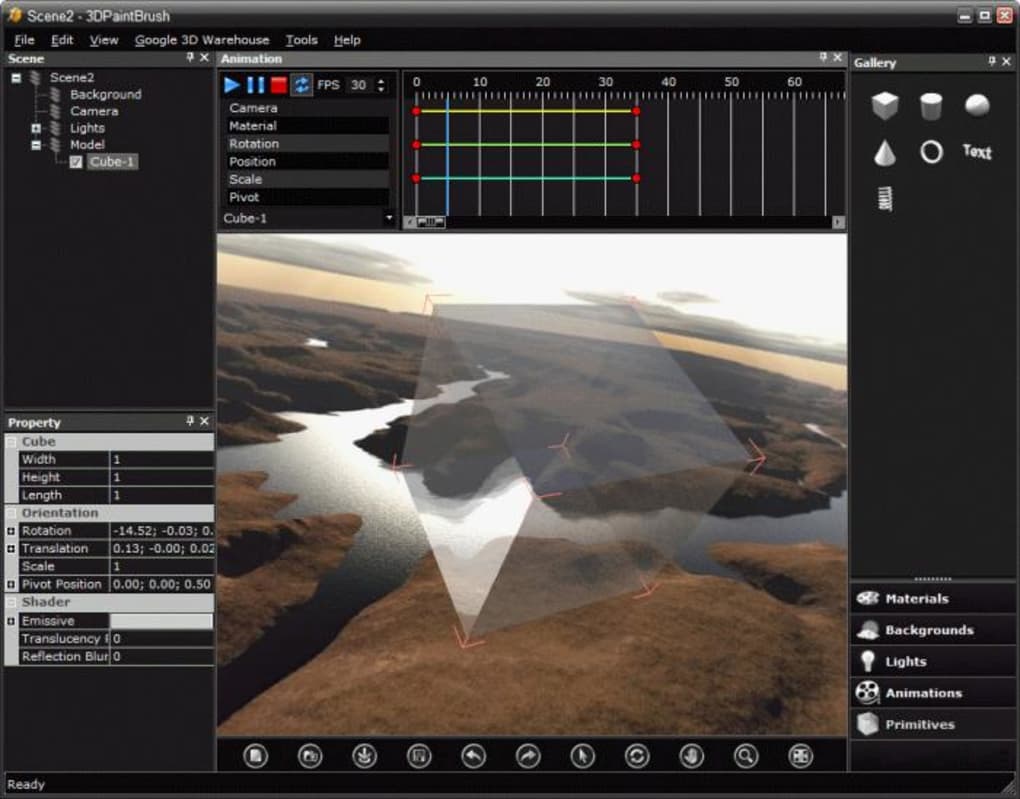
When you open 3DPaintBrush, you’ll be greeted by a clean workspace consisting of a 3D viewport, a toolbar with brush settings, and a timeline at the bottom. Begin by selecting a brush size and colour, then click and drag on the canvas to “paint” geometry. Use the “Extrude” tool to pull surfaces outward, creating depth. To animate, place the timeline cursor at frame 0, shape your object, then move to frame 30 and modify the shape again. The program automatically generates the in‑between frames, giving you a smooth animation with minimal effort.
Compatibility: 3DPaintBrush runs on Windows XP, Windows 2000, and earlier Windows releases. Because it was designed for legacy systems, it does not require DirectX 11 or a modern GPU; an integrated graphics chip is sufficient for basic modelling and preview.
Pros & Cons – A Balanced Look
Pros
- Extremely low system requirements – works on older hardware.
- Brush‑based interface lowers the barrier for newcomers.
- Free trial with no hidden costs or time‑limited restrictions.
- Real‑time preview helps users see results instantly.
- Export options enable workflow integration with other 3D tools.
Cons
- Limited to Windows XP and older; not compatible with Windows 10/11.
- Feature set is basic – no advanced rigging, physics, or texture mapping.
- English‑only UI may be a hurdle for non‑English speakers.
- No built‑in cloud storage; files must be saved locally.
- Last update was in 2011, so support and bug fixes are minimal.
Frequently Asked Questions
Is 3DPaintBrush really free?
Yes. The trial version is completely free to download and use. There are no hidden fees or subscription requirements.
Can I run 3DPaintBrush on Windows 10?
Officially, the software supports Windows XP and earlier. It may launch on Windows 10 in compatibility mode, but performance and stability are not guaranteed.
What file formats can I export?
3DPaintBrush allows you to export models as OBJ or STL files, which are widely accepted by other 3D applications. Animated sequences can be saved as AVI video clips.
Do I need a graphics tablet?
A graphics tablet is optional. The brush tools work with a mouse, but a tablet can provide smoother strokes and more precise control.
Is there any technical support available?
Since the last update was in 2011, official support is limited. However, a community of legacy‑software enthusiasts maintains a forum where you can find tips and troubleshooting advice.
Conclusion – Should You Download 3DPaintBrush?
3DPaintBrush fills a niche that many modern, resource‑hungry 3D packages overlook: a tiny, free, brush‑centric environment for creating basic animations on legacy Windows machines. If you own a PC running Windows XP or an older OS, and you want to experiment with 3‑D design without committing to a steep learning curve or a costly license, this tool is a solid choice. Its real‑time preview, simple key‑frame system, and tiny installer make it especially attractive for students, educators, and hobbyists in regions where newer hardware is scarce.
On the flip side, power users who need advanced rigging, physics simulations, or support for Windows 10/11 will quickly outgrow 3DPaintBrush. The lack of recent updates also means you won’t receive new features or official bug fixes. Nevertheless, for its intended audience—those seeking a free, secure, and easy‑to‑learn entry point into 3‑D animation—3DPaintBrush delivers exactly what it promises.
Ready to start creating? Click the download button below, install the program, and let your imagination paint the third dimension.







